Review Comments (0) Screenshots (6) Questions & Answers (0) Votes (3) Awards (18) Wiki  
(3)
Exlade
3.0.29.569
www.exlade.com
Shareware
$34.95  Purchase
161 people
Download Cryptic Disk

13.02 MBDownloaded 393 times

This software was checked for viruses 5 months ago and was found to contain no viruses.
Click here to see antivirus report.
 
Video tutorial for Cryptic Disk 2.7
Frame
This video tutorial has been acquired from Downloadtube.com

Review

This is official description

Cryptic Disk is able to password-protect and encrypt valuable data stored on disks. Your information will be highly secured because the encrypted data cannot be accessed without entering a password. This tool uses the AES 256-bit encryption algorithm also used by important organizations to protect information.

Cryptic Disk supports multiple users and different levels of access with privileges set by the administrator.
 
The following review written by one of the Software Informer contributors applies to version 2.7

You can password-protect and encrypt valuable data stored on disks with Cryptic Disk. Don't worry anymore about your information, it will be highly secured because the encrypted data cannot be accessed without entering a password, even if stolen. This tool uses the AES 256-bit encryption algorithm also used by important organizations to protect information.

Cryptic Disk supports multiple users and different levels of access with privileges set by the administrator. This way, users can be restricted to access only specified data. This tool uses advanced encryption technology to ensure a quick and easy encryption process. You can even encrypt partitions of a hard drive or removable media, so that other users had to enter a password each time they tried to access those areas. All files stored there are automatically encrypted too, even if the partition is meant to be invisible and inaccessible. The program can also be used on removable storage devices like USB Flash drives. Files will become accessible only if they are decrypted.

Unfortunately, the trial version limits the size that can be encrypted and sets a default password that cannot be changed.
  • Easy to use, no need to be an expert.
  • Removable media support.
  • Partition-level access restriction.
  • Single encryption algorithm.
  • For Windows only.

Reviewed by: Raul Iniguez

Reviewer rating:

Reviewed: 2 years ago

What's new in version 3.0

The following error has been corrected: in Windows XP and Windows 2003 Server operating systems, any encrypted container just mounted would immediately unmount.
The encrypted container creation wizard now uses the default path as the value of the file path input field.
The default container size in the encrypted container creation wizard has been increased to 20 MB.
If the program cannot complete the formatting of an encrypted volume or container, it displays a notification with a description of the problem. For instance, when an encrypted container is created, the program will not be able to format it if it was started with lower privileges.
Improved UAC (User Account Control) support. When an action requiring higher privileges is executed, the program automatically restarts with higher privileges and opens a window corresponding to the selected action.
Added the OFN_DONTADDTORECENT flag to all file selection dialogs that prevents the system from remembering the paths specified by the user.
Added the Hungarian localization.
Fixed the Russian localization.
Added a content tree to the program manual.
Fixed a bug that could cause the program to freeze or crash when mounting or using encrypted volumes on multi-processor (or multicore) platforms.
The “Tip of the day” window is not shown automatically when the program is launched with command line parameters.
Double-clicking the “Unmount” button on the toolbar could cause the program to freeze if the encrypted volume was being used by other programs at that moment.
The interface of the program has been completely redesigned.
The algorithms used for protecting data on encrypted disks, have been heavily modified, which enabled us to drastically improve the data protection aspect of the program.
Added an ability to encrypt disks without losing any information – all the information stored on the disk is encrypted.
Added an ability to create virtual encrypted disks based on file containers mounted as physical drives.
By default, encrypted disks have no signatures that can help determine that these disks were created by Cryptic Disk.
Added an ability to mount encrypted disks to empty folders on NTFS volumes.
To gain access to encrypted disks, users can now use passwords and key files.
The installer now has a new "Extract" mode that enables users to extract all program files for portable use (launching without installation).
The program can automatically play sounds files, launch programs or scripts (CMD Shell, Windows Scripts, PowerShell) upon mounting or unmounting of encrypted disks.
Added an ability to create hidden encrypted disks inside existing encrypted disks. The program supports several nesting levels for hidden encrypted disks: a hidden disk can be created as deep as three levels down.
When working with encrypted disks on multi-processor and multi-core platforms, the program driver uses all available cores for encryption, which gives a solid boost to the speed of encryption and decryption operations.
In addition to the AES (Rijndael) algorithms, the program now supports Serpent, Twofish, Blowfish and CAST6.
Added support of cascade encryption using several encryption algorithms. Users can now select the algorithms and their sequence. This capability makes it possible to increase the length of the encryption key to 2944 bits and dramatically improve the quality of data protection.
The new version of the program features a security mechanism against brute force attacks compliant with the PKCS #5 v2.0 specification. The user can select the algorithms used for obtaining the header encryption key: HMAC-SHA-512, HMAC-RIPEMD-256 or HMAC-Whirlpool.
The "CBC" data encryption mode has been replaced with "XTS", which was developed specifically for encrypting data on storage devices and drives all different types.
Added a virtual keyboard for protecting passwords from being intercepted by key loggers.
Improved support of dynamic volumes (software RAID arrays).
When unmounting an encrypted disk used by other programs, Cryptic Disk shows a corresponding notification with a list of these programs.
When mounting and unmounting encrypted disks, corresponding notifications are shown in the system panel.
You can now define individual hotkeys to each encrypted disk for its quick mounting and unmounting.
A backup copy of the drive’s header is stored at the end of each encrypted disk (can be used if the main header block at the beginning of the disk is damaged).
A new disk header import/export function has been implemented instead of the old encryption key export/import function (to/from a file).
Added full UAC ("User Account Control") support for Windows Vista and Windows 7.
Added a window with program usage tips.
Added a possibility to manually and automatically check for program updates on the program server.
Fixed a bug that occurred in the function responsible for automatically restoring the general access settings when mounting an encrypted disk.

What's new in version 2.4

Plug-in are now supported. The SDK is distributed as open source together with the software distribution package. Now it is possible to configure the screensaver and protect it with a password. A lot of other fixes and improvements.
Report a wrong version Report a wrong program title Suggest a correction

Screenshots

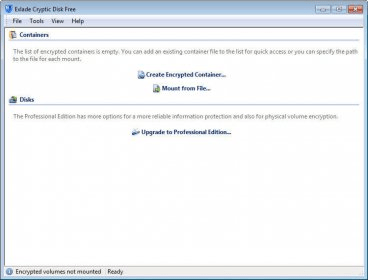
Main Window Main Window Start Start Main Screen Main Screen Options Options
All 6 screenshots

Latest comments


There are no comments, be the first one!
Add new comment

E-mail Address:

Password:

Register now »

Forgot password?

Sign in with:
Download Software Informer Client
Copyright © 2012, Informer Technologies, Inc. About| Privacy and terms| Help| Feedback & Support| Partners program